My Party Is Grinding Trade Vessel & Steam Market Guide: Slots, Lock & Eligible Items
How the Trade Vessel sends Epic+ gear, materials, and Coin Chest drops to the Steam Community Market, covering 4 free slots, the 12-hour lock, and trade rules.
The Trade Vessel (Inventory -> Trade) registers eligible drops into your Steam Inventory so you can list them on the Steam Community Market. You can deposit Epic, Legendary, Mythic, and Eternal gear, materials of any grade in stacks of 5, and  Coin Chest drops one chest at a time. Every account unlocks 4 free selling slots (2 right away on first login and 2 more after 7 days), expandable up to 8 concurrent deposits with the Market Slots Pack, and every listing locks its slot for at least 12 hours.
For early progression milestones, class unlocks, and core farming systems before you begin trading, see our beginner’s progression guide.
What You Can Deposit in the Trade Vessel
Across the 408 pieces in the gear database, only the top 4 grades (Epic, Legendary, Mythic, and Eternal) are eligible for the Trade Vessel. Common, Uncommon, Magic, and Rare gear are blocked from trading by their grade, so Epic drops starting in Hard difficulty are the first tradable equipment you will encounter.
| Grade | Trade status | Drop difficulties |
|---|---|---|
| Common | Untradable | Normal, Hard |
| Uncommon | Untradable | Normal, Hard, Nightmare |
| Magic | Untradable | Normal, Hard, Nightmare, Hell |
| Rare | Untradable | Normal, Hard, Nightmare, Hell, Inferno |
| Epic | Tradable | Hard, Nightmare, Hell, Inferno |
| Legendary | Tradable | Nightmare, Hell, Inferno |
| Mythic | Tradable | Hell, Inferno |
| Eternal | Tradable | Inferno |
Before depositing an Epic or higher item, you must unequip it, unlock it, and strip every enhancement — engravings, enchantments, and socketed gems — at the Mage Tower. Bound equipment cannot enter the Trade Vessel, and any gear bought on the Steam Community Market binds to your account once claimed into your inventory so it cannot be resold.
Eligible materials of any grade move in full bundles of 5 from your bag, whereas Coin Chest trades individually (one chest at a time) and the 119-entry materials database also includes currencies and tickets such as Coin, Diamond, and Dungeon Sweep Ticket. Move any warehouse stacks into your bag first, because partial stacks cannot be loaded.
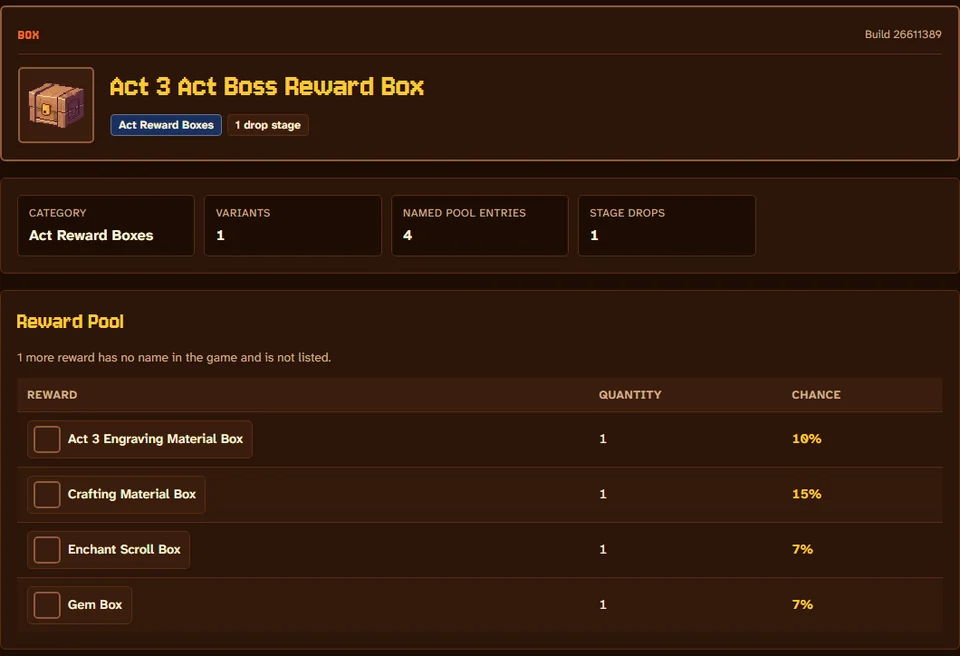
Act Boss encounters drop both material reward boxes and rare Coin Chest items; see how reward pools work across all 19 boxes in our chests and boxes guide and the boxes database. Clearing stage 3-10 (Throne of the Blood Moon) drops Act 3 Act Boss Reward Box, which holds 1 variant and 4 named pool entries: Crafting Material Box at 15%, Act 3 Engraving Material Box at 10%, Enchant Scroll Box at 7%, and Gem Box at 7%.
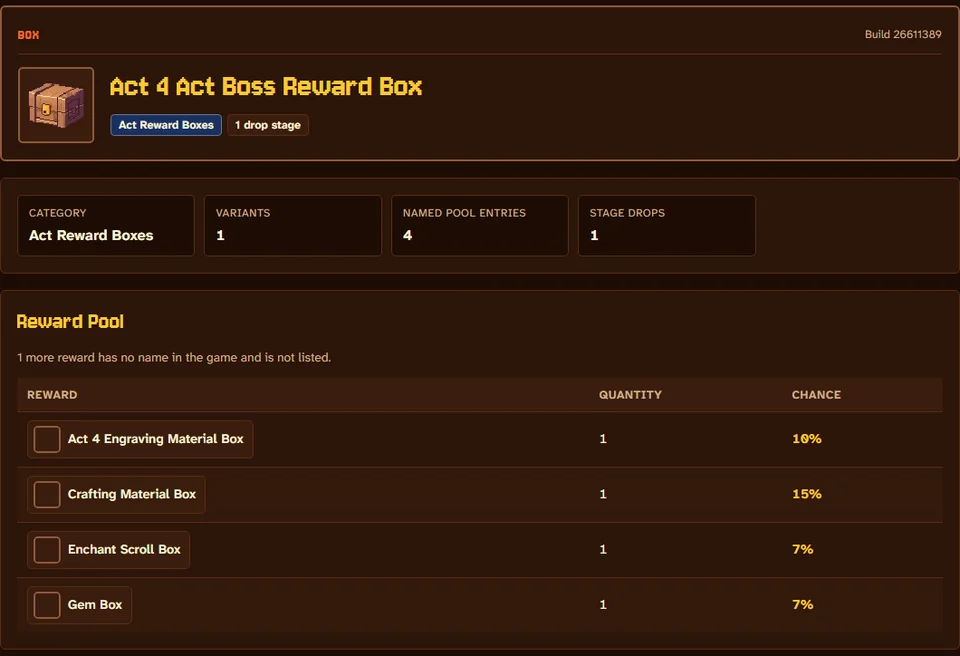
Defeating the Act 4 boss on stage 4-10 (Throne of Death) drops Act 4 Act Boss Reward Box, whose 4 named material box rewards follow the same drop split: Crafting Material Box at 15%, Act 4 Engraving Material Box at 10%, Enchant Scroll Box at 7%, and Gem Box at 7%.
Act Bosses also have a very rare chance to drop a Coin Chest (Mythic grade), which ignores the 5-item material bundle rule and trades on the Market one chest at a time. Its alternative use is selling at the Blacksmith for a flat 1,000,000 Coins, where Blacksmith sale bonuses do not apply.
Trade Vessel Slots and the Market Slots Pack
Accounts start with 4 free Trade Vessel slots unlocked on a two-step schedule: 2 slots open immediately upon first login, and the remaining 2 slots open once the account reaches 7 days (1 week) old. Those free slots let you use all Trade Vessel and Steam Community Market tools without buying paid packs.
| Slot source | Added slots | Unlock timing | Price |
|---|---|---|---|
| First login | 2 | Immediate on first login | Free |
| Account age | 2 | After 7 days (1 week) | Free |
| Market Slots Pack | 4 | Immediate with no wait | $3.99 |
Buying the Market Slots Pack ($3.99) adds 4 additional Trade Vessel slots right away with no waiting period and no game restart required, raising capacity to 8 concurrent deposits. If you refund the pack, those 4 paid slots close and only your age-unlocked free slots remain; already deposited items stay retrievable under regular vessel rules, while new deposits are paused until occupied slots fall below your active cap. For a side-by-side breakdown of all paid packs and the bundle discount, read our DLC packs guide.
Listing Steps, 12-Hour Lock, and Claiming Purchases
Trade Vessel actions require an online connection and follow a strict slot timer that applies identically to both free and paid DLC slots:
- Go to
Inventory -> Trade, right-click or drag an eligible item (or a bag bundle of 5 materials) into Sell Deposit, and pressVto register it in your Steam Inventory. - Click the Market button to put the item up on the Steam Community Market, or use the Storage button to open your Steam Inventory directly.
- Account for the 12-hour lock: once an item is listed, that slot stays occupied for at least 12 hours from listing time even if another player buys it right away.
- Unsold gear and listed materials remain in their Sell Deposit slots past the 12-hour timer until sold or withdrawn. Before pulling an unsold item back after the 12-hour cooldown ends, cancel its active Market listing on Steam first, hover the slot, and press
X(or right-click) with open bag space. - Claim items bought on the Steam Community Market inside the Received tab (Received Box) using the Receive button, or turn on Auto Receive to claim pending entries into your inventory in order.
Server Checks, Market Fees, and Selling Restrictions
Progress, currencies, crafting outcomes, and trade ownership are tracked on the server and synced back into the game rather than handled locally. Neither the Steam store page nor developer announcements from SUPERLINK Games publish a game-specific Market fee percentage, so review the live fee breakdown displayed by Steam before placing a listing.
When the server flags abnormal play on an account, Trade Vessel uploads and selling are restricted while normal gameplay continues, subject to review. Selling penalties run between 2 weeks and 365 days based on the difficulty where cheating was last detected; read our ban policy and anti-cheat guide for full enforcement details and support steps.
Blacksmith Sales vs. Trade Vessel (Sale Orb)
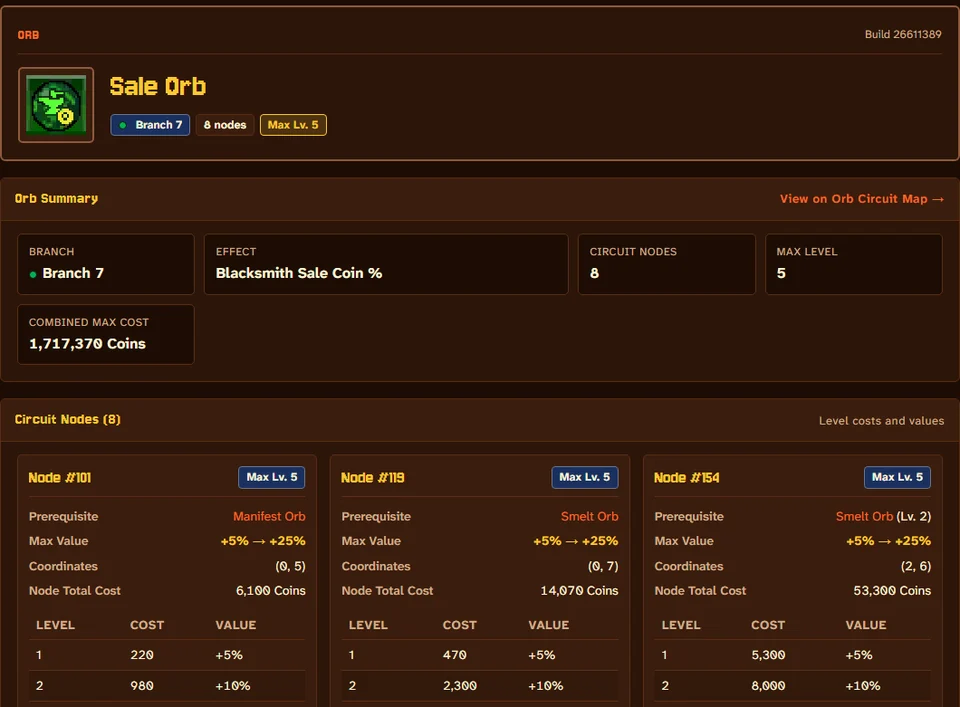
Since equipment below Epic grade cannot enter the Trade Vessel, Common through Rare drops go toward Blacksmith synthesis or Coin sales, while Epic+ drops and Coin Chest drops let you choose between Steam trading and Coins. Spending your Coins on  Sale Orb in Branch 7 of the Orb Circuit database raises Blacksmith Sale Coin % across 8 circuit nodes, each scaling from +5% at Level 1 up to +25% at Level 5.
Maxing all 8 Sale Orb nodes costs 1,717,370 Coins combined, beginning with three early nodes in Branch 7:
| Circuit node | Prerequisite | Level 1 cost | Level 2 cost | Max bonus | Total cost |
|---|---|---|---|---|---|
| Node 101 |  Manifest Orb |
220 Coins | 980 Coins | +25% | 6,100 Coins |
| Node 119 |  Smelt Orb |
470 Coins | 2,300 Coins | +25% | 14,070 Coins |
| Node 154 | Smelt Orb |
5,300 Coins | 8,000 Coins | +25% | 53,300 Coins |
Node 101 unlocks from Manifest Orb, Node 119 unlocks from Smelt Orb, and Node 154 requires Smelt Orb at Level 2.
Keep the Coin Chest rule in mind when weighing Blacksmith sales against the Market: Sale Orb increases regular Blacksmith sale Coins, whereas every Coin Chest pays out a fixed 1,000,000 Coins with sale bonuses disabled.